Preparing this in your language — reload in a moment.
Find your way around
PageDuo is laid out like a file drive. A narrow strip down the left holds the few places you go, and whatever you open fills the big sheet beside it.
- Start from the strip down the left
At the top is your workspace. Under it, 建立 starts anything new. Then come the three places you work in: 傾偈, 檔案 and 數據.

The strip: your workspace, Create, then Chat, Files and Data.v2026-10-11 - Make anything new from Create
One menu for everything: 同 AI 講你需要乜 first, then the kinds you can start yourself — a document, a presentation, a form, an image — then folders and uploads.
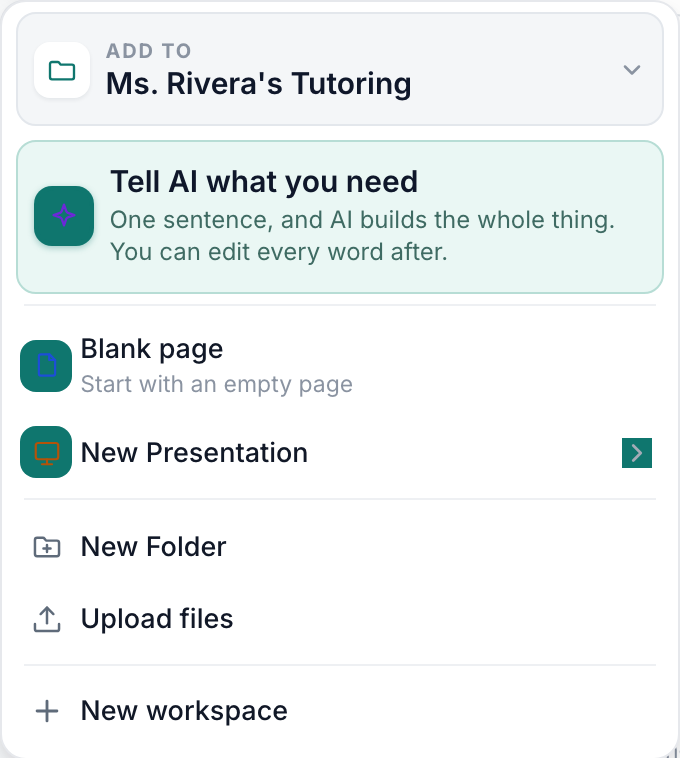
The Create menu — the AI door first, then the kinds, then folders and uploads.v2026-10-11 - Keep your work in Files
Folders and pages, as cards or as a list. The tabs along the top narrow it down: 所有檔案, 同我分享嘅, 加咗星, 已發佈 and 垃圾桶.

Files sorts itself into All files, Shared with me, Starred, Published and Trash.v2026-10-11 - Ask in Chat
Ask a question, or ask it to make a quiz, slides or a page. Make something in Chat covers it.

Chat is in the strip, under Create.v2026-10-11 - Find answers in Data
Every response to every quiz and form in the workspace, in one place, with visits to your published pages beside it.
- Search from the top of the window
搜尋你嘅檔案 finds a page by its name or by the words in it. ⌘K (Ctrl+K on Windows) jumps straight to it.

Search finds a file by its name or its words. ⌘K jumps to it.v2026-10-11 - Open your avatar for the rest
設定, 方案同用量, 幫助 and 登出. Help opens the support page in a new tab, so nothing you have open is lost.
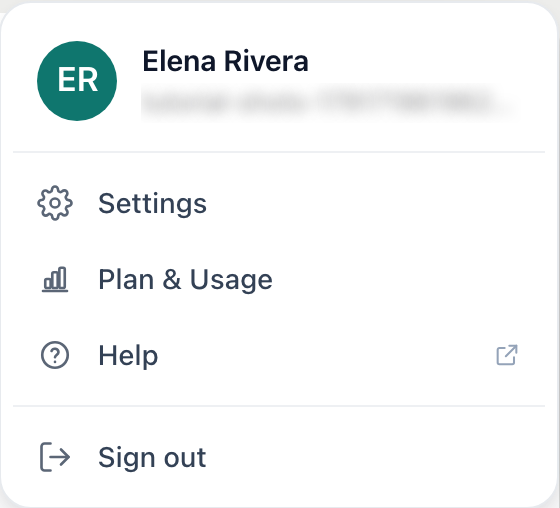
Your avatar: Settings, Plan & Usage, Help, Sign out.v2026-10-11
Every other page in these tutorials starts from this layout, so it is worth two minutes.