Preparing this in your language — reload in a moment.
Give a quiz to a room
Give to class puts a short code and a QR code on the screen — for a staff meeting as much as a classroom. People open it on their phones, tap their name from your list and answer, with no accounts, and each answer arrives with the right name on it.
- Press Give to class
Gefa bekk is in the top bar of any page that collects answers.

Give to class — on any page that collects answers.v2026-11-18 - Make the group once
Type a Nafn bekks — "Monday shift" — and paste the names, one per line, straight from a spreadsheet or a message. First names are enough. Next time, you just pick the group.
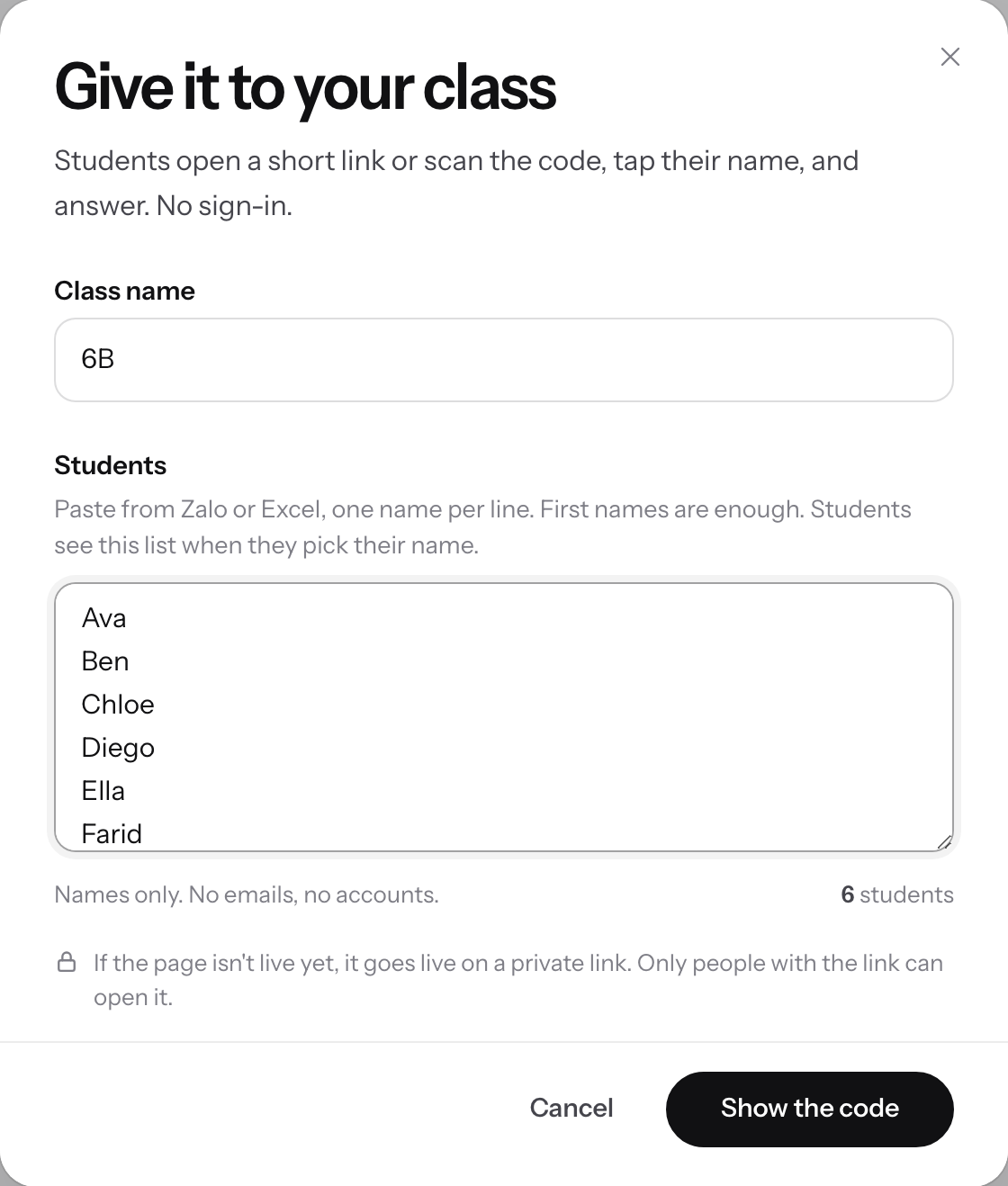
Name the group, paste the names, then Show the code.v2026-11-18 - Press Show the code
A full-screen board shows a QR code and a six-letter code. If the page is not live yet, it goes live on a private link.
- Everyone scans, taps their name and answers
They scan the QR code, or go to pageduo.ai/a and type the code. The board counts who has joined and who has answered.
- Close answers when time is up
Loka svörum stops new ones; Opna svör aftur lets them in again. Sýna hverjir hafa svarað lists names on the board only when you choose.
- Read the answers with names
Responses shows each answer under the person who gave it.
Nobody needs an account, and names stay off the screen unless you choose to show them.