Preparing this in your language — reload in a moment.
Ask @pageduo in a comment
Anyone reading can ask @pageduo in a comment and get an answer in the same thread — nobody waits for the author. @pageduo reads the page, the thread and the files the asker can open, and answers from them.
- Start a comment or a reply
On the words the question is about, or on a thread that is already there.
- Type @, then pick @pageduo
It is first in the list. A line under the box says what @pageduo reads: this page, this thread and the files you can open.
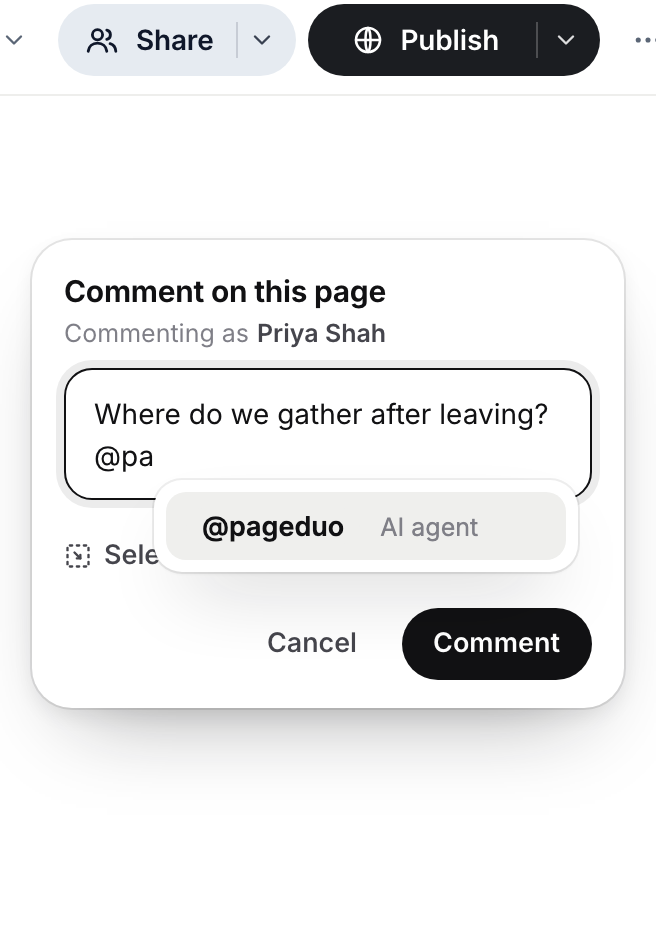
Type @ and pick @pageduo.v2026-11-18 - Ask the question and post it
"Where do we gather after leaving?" @pageduo answers in the thread within seconds, quoting the page where it can.
- Keep the conversation going
Reply to its answer — no need to type @pageduo again — and it answers the follow-up with the whole thread in mind.
- Ask it to do the work, too
"Summarise this thread", "Turn these answers into a checklist", "How many people answered the RSVP?" — on a page that collects answers, it can read them for you.
The author still sees every question and answer, and can correct one by replying.