Preparing this in your language — reload in a moment.
Make it all at once in Auto Mode
In Auto Mode you describe the whole thing and PageDuo builds it — the writing, the design and anything interactive. You edit afterwards. Web pages and forms are always made this way.
- Press Create, then choose what to make
Dynamic Webpage and Dynamic Form start in Auto Mode. For a doc or slides, open the arrow beside Dynamic Doc or Dynamic Slides and choose Auto Mode — kérd meg @pageduo-t, hogy alkosson meg mindent.
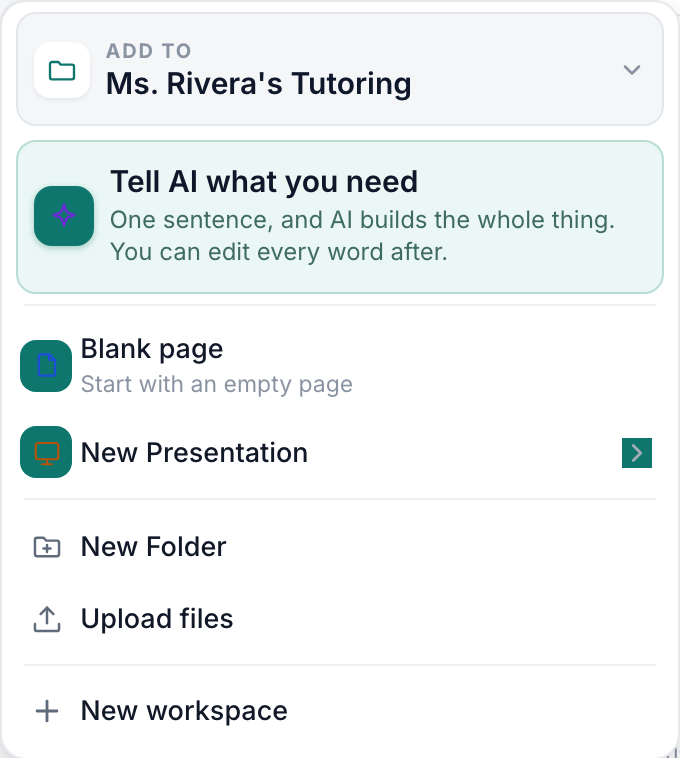
The Create menu — Tell AI first, then the Dynamic kinds, the media, then folders and uploads.v2026-11-18 - Describe it in one go
Chat opens with the kind and the folder set. "A one-page welcome guide for new baristas at Alder Street Coffee: our three cafés, the first-week schedule and who to ask." Who it is for and what it must include matter more than length. The + attaches notes or a file to work from.

Describe the whole thing in one go.v2026-11-18 - Check the details, then press Build it
PageDuo confirms a few details first — what to include, whether to collect responses, which features. Tap a chip to change one.
- Pick the design, or press Let PageDuo decide
A mi ajánlásunk is marked. Search or browse by category, or leave it to PageDuo. Szín és betűtípus módosítása adjusts the one you chose.
- Watch it being built, then open it
The page appears in the chat as it is written; a small one takes under a minute. When it is done, Megnyitás most takes it to the editor.
- Read it before you share it
It is a first draft with your details in it, not a finished page. Edit and design covers changing it.
Would rather write it yourself, with suggestions as you go? See Co-write in Duo Mode.